
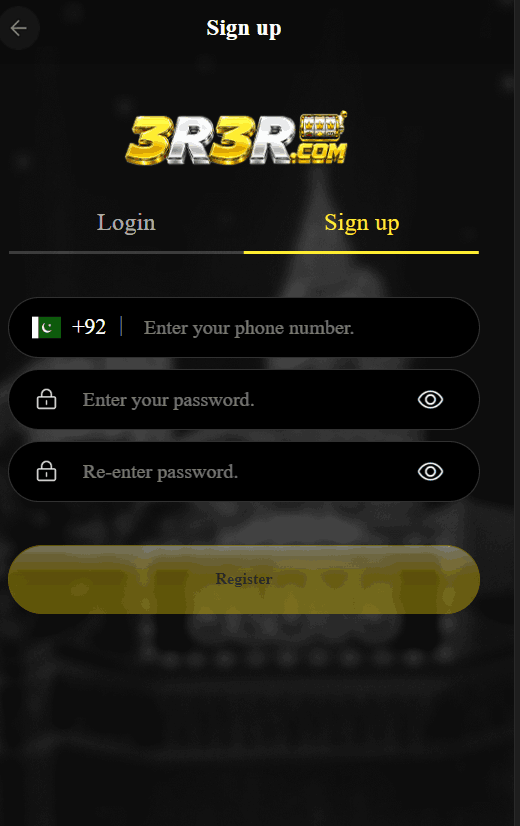
3R3R Register is the first step for Pakistani users who want to create an account on the 3R3R Game platform. It is a gaming and earning app designed for users who want to explore online games. However, new users must complete the registration process before accessing their accounts.
If you are visiting the platform for the first time, you may be wondering how to register. Don’t worry, the registration form is simple and requires a Pakistani mobile number and a password.
In this guide, we explain how to create an account on 3R3R Game step by step. We also discuss common registration problems and their possible solutions. So, let’s understand the process.
How to Register an Account on 3R3R Game?
Creating an account on 3R3R Game is straightforward. Follow these simple steps to complete your registration.
Step 1: Visit the Official Website:
First, open your mobile or computer browser and visit the official 3R3R website or app.
Step 2: Click on Sign Up:
After opening the website, find the Sign Up option and click it. The registration form will appear on your screen.
Step 3: Enter Your Mobile Number:
Select Pakistan’s country code (+92) and enter your Pakistani mobile number in the required field. Make sure your number is correct before continuing.
Step 4: Create a Password:
Enter a password in the password field. Choose a strong password that is difficult for others to guess.
Step 5: Confirm Your Password:
Enter the same password again in the confirmation field. Both passwords must match to avoid registration errors.
Step 6: Click the Register Button:
Finally, check your entered information and click the Register button. Wait for the website to process your request and follow any additional instructions displayed on the platform.
After creating an account? Visit our 3R3R Login page to access your account.
Common Problems and Solutions While Creating an Account:
Sometimes, users may face problems while registering on 3R3R Game. However, checking a few basic details can help resolve common registration issues.
Here are some problems you may encounter and their possible solutions.
Phone Number Is Not Accepted:
If the website does not accept your mobile number, you may have entered incorrect digits or selected the wrong country code.
Solution:
- Check that the country code is +92.
- Enter your correct Pakistani mobile number.
- Remove unnecessary spaces or extra characters.
- Check the number before submitting the form again.
Passwords Do Not Match:
This problem occurs when the password entered in the confirmation field is different from the original password.
Solution:
Check both password fields carefully. Enter the same password in each field. You can also use the eye icon to view your password and identify typing mistakes.
Register Button Is Not Working:
Sometimes, the Register button may not respond when you click it. This can happen because of incomplete information or a temporary website issue.
Solution:
- Check that all required fields are completed.
- Make sure both passwords match.
- Check your internet connection.
- Refresh the page and try again.
Website Is Not Opening:
A slow internet connection or temporary website problem may prevent the registration page from loading properly.
Solution:
- Check your internet connection.
- Refresh the website.
- Try opening it in another browser.
- Visit the website again after some time.
Phone Number Is Already Registered:
You may see this message if an account already exists with your mobile number.
Solution:
Try the Login option instead of creating another account. If you cannot access your existing account, check whether the platform provides an account recovery option.
Conclusion:
Creating an account on 3R3R Game is a simple process for Pakistani users. You need to visit the official website, select Sign Up, enter your mobile number, create a password, and confirm it.
We recommend checking all your information before submitting the registration form. Additionally, use a valid mobile number and a strong password to avoid common mistakes.
By following the steps explained in this guide, new users can understand the 3R3R registration process and complete the form more easily.
FAQs:
How can I create an account on 3R3R Game in Pakistan?
Visit the official 3R3R website, click Sign Up, enter your Pakistani mobile number, create a password, confirm it, and click Register.
What information is required to create an account on 3R3R?
The registration form requires a Pakistani mobile number, a password, and password confirmation.
Does 3R3R support Pakistani mobile numbers?
Yes, the registration page displays Pakistan’s country code (+92), allowing users to enter their Pakistani mobile numbers.
What should I do if the Register button is not working?
Check that all required fields are completed correctly. Also, check your internet connection, refresh the page, and try again.
Is OTP verification required for 3R3R registration?
The registration form does not display an OTP field. If the website requests additional verification after submitting the form, follow the instructions provided.
What should I do if my mobile number is already registered?
Try logging in with your existing account. If you cannot access it, check whether an account recovery option is available.